
Never touches your file
No lock, no temp files beside it, no writes, so your agent can overwrite, replace or delete it at any time. A half-written file is never shown: the last good version stays on screen until the new one is complete.
Free · Open source · No account · Windows & Linux
Open your mind. Not your file.
Watch Claude Code, Codex or any AI agent edit Excel, live. Total Recalc reloads the model as soon as the agent saves, keeps your place, and shows what was edited and what merely recalculated.
v0.1.0 · Windows and Linux · all downloads
Excel holds the file open, so the agent can't save.
Close it and reopen, and you're back on Sheet1, cell A1.
And nothing tells you which of 10,000 cells moved.
Total Recalc reads your file into memory and lets go. Your agent writes; you watch.
No lock, no temp files beside it, no writes, so your agent can overwrite, replace or delete it at any time. A half-written file is never shown: the last good version stays on screen until the new one is complete.
Every save lands on the same sheet, scrolled to the same place, with the same cells selected, even when the agent inserts rows above you. Press Space to pause and hold the version on screen while you talk it through; it keeps count of what's waiting.
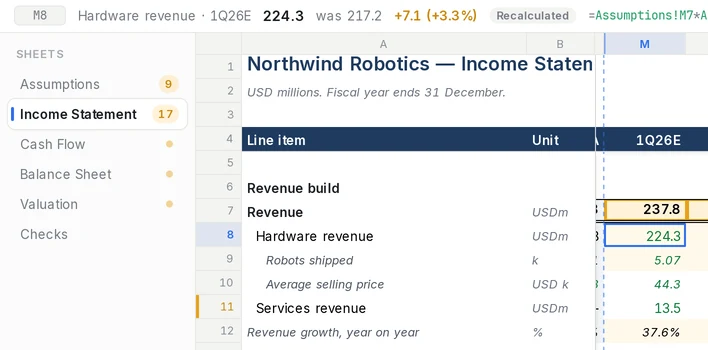
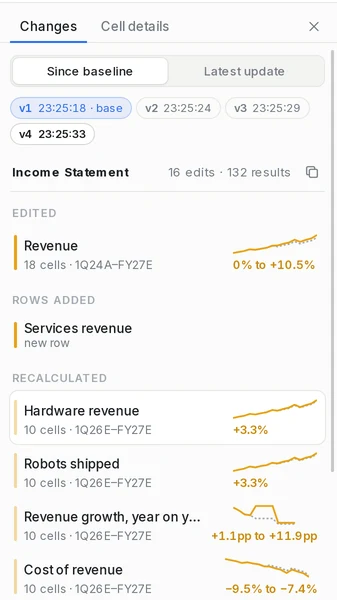
Cells the agent edited are kept apart from cells that merely recalculated, so the headline reads "3 edits · 240 results", not a carpet of highlights. The Changes panel groups them by row with before-and-after sparklines, against a baseline you set. Rows are matched by their labels, so an inserted row is one new row, not a shift of everything below it.
Select the cells you want to talk about and press Ctrl Shift C. Total Recalc copies them with their labels, formulas and what they used to be, ready to paste.
**northwind.xlsx** · sheet **Income Statement** · v3 · 22:05:09

- `M8` Hardware revenue · 1Q26E: **224.3** `=Assumptions!M7*Assumptions!M9` (was 217.2, +7.1 (+3.3%))
- `M17` Gross margin · 1Q26E: **46.0%** `=M16/M7`
- `V17` Gross margin · FY27E: **48.5%** `=V16/V7` (was 47.0%, +1.5pp)Why is the 2027 margin up 1.5 points? Lift it to 49% and show me the bridge.
Done: 2027 gross margin set to 49.0% in Assumptions. The bridge is on a new Margin bridge sheet.
Total Recalc: 8 edits · 1 sheet added
Version 0.1.0 · changelog · checksums · built by GitHub Actions from the tagged commit
.\totalrecalc.exe "C:\path\to\model.xlsx"The first time, Windows may show this. Total Recalc isn't code-signed yet, so Windows doesn't recognise the publisher. Choose More info, then Run anyway, if you trust the release: it is built in public by GitHub Actions from the tagged source, and you can check the file against the published checksums. Some managed work PCs won't allow unsigned apps at all; ask your IT team, and please don't turn protection off.
totalrecalc command
chmod +x totalrecalc-linux-amd64.AppImage
./totalrecalc-linux-amd64.AppImage model.xlsxIf it complains about FUSE: sudo apt install libfuse2t64 on Ubuntu 24.04 (libfuse2 on older releases).
sudo apt install ./totalrecalc-linux-amd64.deb
totalrecalc model.xlsxWEBKIT_DISABLE_DMABUF_RENDERER=1 totalrecalc model.xlsx: it works everywhere, but is slower on large high-resolution screens.sudo apt install build-essential curl wget file libwebkit2gtk-4.1-dev \
libxdo-dev libssl-dev libayatana-appindicator3-dev librsvg2-dev patchelfgit clone https://github.com/thomasrice/totalrecalc.git
cd totalrecalc
pnpm install --frozen-lockfile
pnpm tauri buildpnpm tauri build --no-bundle) and tell us how it goes.The repository includes a small demo model and a script that plays an agent revising it every few seconds.
git clone https://github.com/thomasrice/totalrecalc.git && cd totalrecalc
totalrecalc demo/northwind.xlsx &
uv run --with openpyxl demo/agent.py demo/northwind.xlsxWith the AppImage, use its path in place of totalrecalc. No uv? pip install openpyxl, then python demo/agent.py demo/northwind.xlsx. On Windows, start Total Recalc and drag demo\northwind.xlsx onto it first.
No. The app makes no network requests and has no telemetry. It reads the file you open and nothing else. This website has no analytics and sets no cookies.
No, by design. It never writes to the file, never locks it, and never creates files beside it. Editing is your agent's job.
.xlsx and .xlsm (Google Sheets: export as .xlsx). Every version is recalculated by a built-in engine, IronCalc. Where it can't evaluate a formula faithfully (INDIRECT, OFFSET, links to other workbooks), it shows the value Excel saved in the file and marks it. Files written by scripts often carry no saved values, so there the engine's result is all there is, and a formula it can't calculate is marked unavailable rather than guessed.
Charts and images aren't drawn, and formatting-only changes aren't reported as changes. It's a viewer for numbers and formulas.
About a second after the file stops changing. Very large workbooks take longer to recalculate; the previous version stays on screen meanwhile, and the top bar says it's recalculating.
It recalculates everything, every time, and the previous value is always one key away. And yes, the film.
It should build, but it's untested. See Build from source.
Yes. MIT licensed, no account, no paid tier. Issues and pull requests are welcome on GitHub.